Login to the Premium Website:
Enter your Username and Password below:
Username:
Password: Teacher School User Home User
Learn More | Register

Other Links on MrNussbaum.com
Sign in to premium
Learn about premium
 What's new?
 Join the newsletter
 Contact me
 Links to other sites

Join the Mailing List
Enter your name and email address below:
Name:
Email:
Subscribe  Unsubscribe 

Games Poll:


Links to Site

Web mrnussbaum.com

Home >> Games >> Tony Fraction's Pizza Shop
Tony Fraction's Pizza Shop
This game requires the LATEST version of Flash to be installed on your computer
If you like this game, see how much better it is on the premium site!

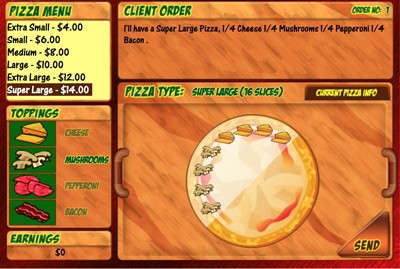
  • Step 1.) Read the client order. A sample client order might read "I'll have a large pizza, 1/2 pepperoni, 2/5 mushrooms and 1/10 bacon"
  • Step 2.) Select pizza size. In this case, select "large". This will cause the denominator to change to 10, as a large pizza has ten slices.
  • Step 3 and 4.) Select toppings. First, click on pepperoni and apply to half of the pizza (5 slices). Next, click on mushrooms and apply it to 2/5 of the pizza (4 slices). Finally, click on bacon and apply it to 1/10 of the pizza (1 slice). NOTE - if you make a mistake, select a different pizza size and then re-select the original pizza size to get a new pizza.
  • Step 5) Click on "send". If you are correct, you will make a sale. Incorrect pizzas will cost you! Enjoy the game!

Rationale/Skills for Tony Fraction’s Pizza Shop


Grade Level: Fourth and Up

Skills: Equivalent Fractions, Practical use of Fractions

Object: Make as many pizzas as possible in five minutes based on customer orders.

Tony Fraction’s Pizza Shop is one of the most popular games on MrNussbaum.com and one of the most popular fraction games on the internet. Students play the role of a pizza shop owner who must fulfill the peculiar topping orders of his customers. Different pizza slices determine the denominator of the fraction, which keeps the game dynamic, unpredictable, and exciting. For example, a “customer” might order a large pizza ½ pepperoni, 2/5 extra cheese, and 1/10 bacon. The student would first choose “large” from the pizza size menu. A large pizza has ten slices, so the user would put pepperoni on five, extra cheese of four, and bacon on one. After each pizza is made, a new customer makes a different order. If the order is made incorrectly, the user will lose money.

This is a fantastic game for students who learn visually. It is easily used on a Smartboard and will engage students for long periods of time.

mrnussbaum.com copyright 2008-2015 by Greg Nussbaum. All rights reserved | Privacy Policy | Advertise on this site


1 1